
Canada Head Office
5 Diagonal Road Toronto, Ontario , M2N 2R6 Canada
International Office India
A-4, Sector 4 Noida, 201301
5 Diagonal Road Toronto, Ontario , M2N 2R6 Canada
A-4, Sector 4 Noida, 201301
Cursor AI transforms how developers write code. Autocomplete entire functions, chat with your codebase, and ship 10× faster — powered by GPT-4 and Claude.
# Cursor AI suggests entire functions in real time
async def fetch_user_data(user_id: int) -> dict:
    async with aiohttp.ClientSession() as session:
        url = f"https://api.example.com/users/{user_id}"
        async with session.get(url) as resp:
            # ✦ Cursor AI
            data = await resp.json()
            return {
                "id": data["id"],
                "name": data["name"],
                "email": data["email"],
                "created_at": data["created_at"]
}Cursor AI is a next-generation, AI-first code editor built as a fork of Visual Studio Code. Unlike traditional editors with bolt-on AI plugins, Cursor AI integrates large language models natively at the core — making AI assistance seamless, fast, and incredibly accurate.
Developed by Anysphere Inc. and launched in 2023, Cursor AI quickly became the preferred choice for developers at Stripe, OpenAI, Shopify, Midjourney, and thousands of startups. It supports every major programming language and framework out of the box.
What sets Cursor AI apart is its deep codebase understanding. You can ask it questions about your entire project, refactor code across multiple files simultaneously, and let it fix bugs by reading your terminal output — all without leaving the editor.
All your existing VS Code extensions, themes, and keybindings work out of the box. Zero migration friction.
Switch between top frontier models. Pro users get access to Claude Sonnet, GPT-4o, and more.
Enable Privacy Mode to ensure your code is never stored or used for model training.
Cursor indexes your entire repo so the AI understands the full context of your project, not just one file.
Cursor AI packs a full suite of AI-powered tools that work together seamlessly inside one editor.
Cursor's Tab feature predicts and completes entire functions, blocks, and files — not just single lines. Hit Tab, and multi-line code appears instantly.
Select any code block and press Cmd+K to prompt Cursor AI to rewrite, refactor, or explain it. Changes appear as diff views you can accept or reject.
Open the AI chat panel and ask anything — "where is the authentication logic?" or "refactor this module to use async/await." It knows your entire project.
The Composer lets you give high-level instructions across multiple files. Cursor AI acts as an agent, writing and editing code autonomously across your codebase.
Paste error messages or terminal output directly into the chat. Cursor AI reads the stack trace and suggests targeted fixes in the right files.
Choose between Claude 3.5 Sonnet, GPT-4o, GPT-4 Turbo, and Cursor's own fast models — all from the same editor interface.
Add URLs, documentation, or custom knowledge as context. Cursor AI can search the web and reference external docs when answering questions.
Apply changes across dozens of files simultaneously. Refactor an API, rename a database column, or update a design system — all in one shot.
Define project-specific coding conventions in a .cursorrules file. The AI will follow your style guide, naming conventions, and architectural patterns.
Install Cursor AI from cursor.so — available for Mac, Windows, and Linux. It imports your VS Code config automatically.
Start free or pick a Pro/Business plan for unlimited AI requests. Buy Cursor AI directly or through our reseller link below.
Open any existing codebase. Cursor AI indexes your project and builds an understanding of your architecture in seconds.
Press Tab for autocomplete, Cmd+K to edit, or open Chat to ask anything. Your AI pair programmer is ready.
These shortcuts unlock Cursor AI's full power. Learn them once, save hours every week.
These are the techniques top developers use to get dramatically better results from Cursor AI.
Create a .cursorrules file in your project root with your coding conventions — preferred libraries, naming patterns, file structure. Cursor AI will follow these rules in every suggestion across your entire team.
Use TypeScript strict mode. Prefer async/await over .then(). Name components in PascalCase. Use Tailwind for all styles.
In the AI chat, type @filename to add a specific file, @symbol for a function, @docs for documentation, or @web to let Cursor AI search the internet. Stacking multiple @ references gives the AI maximum context.
When you hit a runtime error or failed test, copy the full stack trace and paste it into Cursor AI chat with "fix this." Cursor reads the error, finds the affected files automatically, and proposes a targeted fix — often resolving bugs in seconds.
Don't use Composer for tiny edits — save it for feature-level tasks. A good Composer prompt: "Build a user authentication system with JWT tokens, a login page, and protected routes. Use Express.js and store sessions in Redis." It will create all necessary files.
Prompt Cursor AI to write unit tests before implementing a feature. This gives you a clear spec, and when you use Cursor to write the implementation, it uses the tests as a guide — resulting in cleaner, more testable code by default.
In Settings → Features → Docs, add URLs to any library or framework documentation you use. Cursor AI will index these pages and reference them when suggesting code — resulting in more accurate, up-to-date suggestions for newer libraries.
Use fast models (cursor-fast) for autocomplete and trivial edits. Switch to Claude 3.5 Sonnet or GPT-4o for complex reasoning, architecture decisions, and multi-file refactors. The right model for the right task preserves your premium request quota.
Select any unfamiliar code block and type "explain this line by line." Cursor AI produces clear, step-by-step explanations. This is invaluable when onboarding onto a legacy codebase or reading open-source libraries you didn't write.
Cursor AI presents its changes as a diff. Always review the diff before accepting. For Composer changes, use "Accept All" only after reviewing — or selectively accept file-by-file. This habit catches AI mistakes before they enter your codebase.
Cursor AI Notepads (in the sidebar) let you save reusable context blocks — like your database schema, API contracts, or design decisions. Reference them with @notepadname in any chat to give the AI instant project knowledge without re-explaining.
Whether you're building web apps, mobile apps, data pipelines, or embedded systems — Cursor AI understands your language and framework deeply.
The most common question developers ask before switching. Here's an honest, detailed comparison.
| Feature | ⚡ Cursor AI | GitHub Copilot | Codeium | Tabnine |
|---|---|---|---|---|
| Multi-file editing | ✓ Full | ~ Limited | ✗ | ✗ |
| Chat with codebase | ✓ Full repo context | ~ File only | ~ Basic | ✗ |
| Model choice (GPT-4, Claude) | ✓ Multiple models | ✗ Copilot only | ✗ Codeium only | ✗ Tabnine only |
| Built on VS Code | ✓ Full fork | ✓ Extension | ✓ Extension | ✓ Extension |
| Autonomous agent (Composer) | ✓ Native | ✗ | ✗ | ✗ |
| Terminal error fixing | ✓ | ~ Experimental | ✗ | ✗ |
| Privacy Mode | ✓ Full | ~ Enterprise only | ✓ | ✓ |
| Free tier | ✓ Generous | ✓ Limited | ✓ Unlimited | ✓ Limited |
| Starting price | $20/mo | $19/mo | $12/mo | $12/mo |
Choose Cursor AI if: you want the deepest AI integration available, you work on multi-file codebases, you want to choose between AI models, or you're building new projects from scratch. The Composer agent mode alone justifies the switch for most developers.
Stick with Copilot if: your organization is locked into the Microsoft/GitHub ecosystem, you need JetBrains IDE support, or your workflow lives in environments Cursor doesn't support yet (like Vim/Neovim, though Cursor support is coming).
Bottom line: Most developers who switch to Cursor AI don't go back. The productivity gains from full codebase context, model switching, and Composer mode are simply too large to ignore once experienced.
Move from idea to MVP in days, not months. Cursor AI writes boilerplate, scaffolds full-stack apps, and lets one developer do the work of five. Ideal for non-technical founders who can code basics and need AI to fill the gaps.
Onboard new engineers faster by letting Cursor AI explain legacy codebases. Enforce company-wide coding standards via .cursorrules, and let senior engineers review AI-generated changes rather than writing everything from scratch.
Cursor AI is like having a senior developer sitting next to you at all times. Ask it to explain any concept, show alternatives, or walk through why code works. It accelerates learning without doing the thinking for you.
Generate data pipelines, write pandas transformations, scaffold PyTorch training loops, and debug CUDA errors — all within the editor. Cursor AI understands scientific Python and ML frameworks deeply.
Take on more clients and deliver projects faster. Cursor AI handles repetitive code, writes tests, and documents APIs — freeing you to focus on architecture and client relationships.
Write Terraform configs, Kubernetes manifests, CI/CD pipelines, and shell scripts with AI assistance. Cursor AI understands infrastructure-as-code and can debug configuration errors from logs.
"Cursor AI completely changed how I build products. I shipped a full SaaS MVP in 3 weeks that would have taken 3 months. The codebase chat feature is absolutely insane — it knows my entire project."
"I've tried GitHub Copilot, Codeium, and Tabnine. Nothing comes close to Cursor AI. The Composer feature is like having a junior dev who never sleeps. Multi-file edits that used to take me 2 hours now take 10 minutes."
"Our entire 12-person engineering team switched to Cursor AI 6 months ago. On-boarding speed tripled — new engineers can navigate our legacy codebase in days by just asking Cursor AI questions."
"As a data scientist, I was skeptical. But Cursor AI handles pandas, sklearn, and PyTorch extremely well. It even debugged a vectorization issue I'd been stuck on for two days in under a minute."
"I run a freelance agency. Cursor AI lets me take on 40% more client work. I use it for everything — React components, API integration, writing tests. The ROI on the $20/month Pro plan is laughable."
"I'm a bootcamp graduate with 1 year of experience. Using Cursor AI feels like having a senior developer reviewing and improving my code in real time. My GitHub PRs are objectively better now."
Join 500,000+ developers who use Cursor AI every day to ship better code, faster. Start free or buy a Pro subscription.
Cursor AI is an AI-powered code editor built on top of Visual Studio Code, supercharging traditional coding with intelligent automation and natural language understanding. It’s designed to help developers write, understand, refactor, and debug code faster and more accurately essentially acting as your AI pair programmer inside your editor.
Whether you’re typing a function or maintaining a complex codebase, Cursor AI understands your project context and offers suggestions that feel like they came from an expert teammate.

Cursor AI helps developers code faster and smarter by combining AI-powered autocomplete, real-time debugging, and context-aware suggestions directly inside your editor.


Cursor AI doesn’t just autocomplete lines — it predicts multi-line edits, suggests restructures, and generates code based on what you intend to build, saving hours of manual work.
Instead of navigating documentation or Stack Overflow, you can simply ask Cursor to solve issues, refactor code, add features, or explain logic — all in plain English.
Unlike generic autocomplete tools, Cursor indexes your entire codebase, giving it deep contextual awareness that leads to smarter suggestions and fewer irrelevant changes.
Because Cursor is built on the VS Code ecosystem, your favorite extensions, themes, and shortcuts work right out of the box. This makes the transition seamless even for experienced developers.
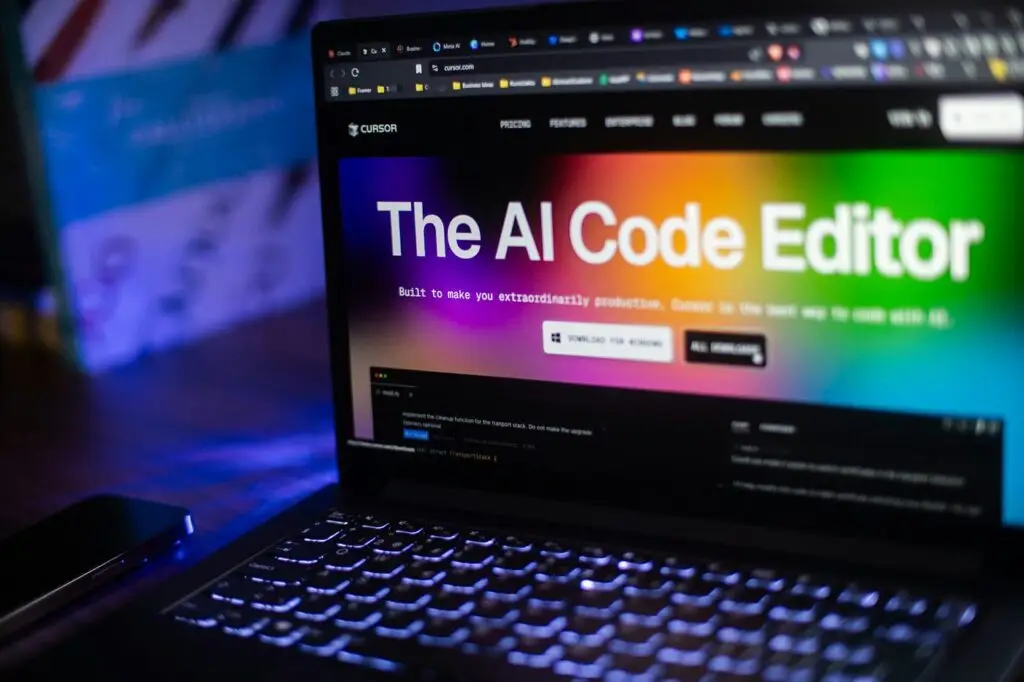
Harness the power of the AI-native code editor, Cursor AI, with expert cursor ai development services that go beyond simple installation. We offer full-lifecycle support, from custom LLM model fine-tuning to seamless enterprise integration with your existing security and CI/CD workflows, providing complete and tailored
cursor ai development solutions.
Partner with us to not only adopt AI coding but to truly transform your software delivery pipeline, accelerate feature velocity, achieve a documented 10x developer productivity increase, and significantly minimize long-term technical debt.
In today’s fast-moving software world, traditional coding environments are no longer enough. Engineering teams face pressures like tighter deadlines, bigger codebases, multi-stack complexity and growing demand for collaboration. That’s where Cursor enters the picture.
Cursor merges the power of large-language-models, code-analysis, agent workflows and real-time collaboration to deliver a smarter coding experience. For example, Cursor enables context-aware autocompletion, multi-line editing, integrated chat for debugging, and seamless integration with popular developer tools.
By adopting Cursor (and pairing it with professional cursor ai development services), organisations can reduce time to market, lower defects, improve code quality and free up engineering talent to focus on creativity and innovation.
Ship features twice as fast with AI-powered code generation and intelligent autocomplete. What takes weeks now takes days, allowing developers to focus on innovation instead of boilerplate code.
Fix bugs in minutes instead of hours with intelligent analysis that pinpoints issues and suggests solutions. Modernize legacy code in weeks instead of months with AI-assisted refactoring across multiple files.
Automate tedious work like unit tests, documentation, CRUD operations, and API endpoints. Free your developers to focus on creative problem-solving and complex architecture.
Enterprise-grade security with SOC 2 Type II certification ensures your code and IP are protected. Privacy Mode, local processing, and no-training options give you complete control over sensitive code.
in Code Completion Accuracy
Developer Onboarding
in Code Review Cycles
We build, migrate, and integrate Salesforce solutions that streamline sales, automate processes, and unlock accurate reporting — ready in weeks, not months.
Cursor AI is an AI-powered code editor designed to help developers write, understand, refactor, and debug code faster using natural language. Unlike traditional editors that rely mainly on manual coding and static autocomplete, Cursor AI allows developers to talk to their code, ask questions, and receive context-aware suggestions directly inside the editor.
What makes Cursor AI different is its deep understanding of entire codebases, not just single files. It can analyze project-level context, suggest improvements, explain unfamiliar code, and even generate new features while following your existing architecture. This reduces cognitive load and helps developers focus more on problem-solving instead of syntax.
Developers are switching to Cursor AI because it significantly reduces development time while improving code quality. Instead of constantly switching between documentation, Stack Overflow, and IDEs, developers can get instant, relevant answers inside the editor.
Cursor AI also helps reduce burnout by handling repetitive tasks like boilerplate code, refactoring, and bug explanations. For teams working under tight deadlines, it acts like an always-available AI pair programmer—speeding up workflows without sacrificing control or readability.
Cursor AI builds contextual awareness by analyzing your files, folder structure, dependencies, and coding patterns. This allows it to understand how different components interact rather than treating files in isolation.
Because of this deep context, Cursor AI can safely modify or generate code that aligns with your project’s architecture. Whether you ask it to refactor a function, explain legacy logic, or add a new feature, the AI responds with code that fits naturally into your existing system—minimizing errors and rework.
Cursor AI goes far beyond basic code generation. It can explain complex logic in plain English, identify potential bugs, suggest performance optimizations, and help with large-scale refactoring.
It’s especially useful for onboarding new developers. Instead of spending hours understanding unfamiliar codebases, users can ask Cursor AI to explain how specific files, functions, or workflows operate. This makes it a powerful tool not just for coding, but for learning, collaboration, and maintenance.
Cursor AI is often described as an AI pair programmer because it collaborates with developers in real time. You can ask it why something works, how to improve it, or what changes are needed to meet a requirement.
Unlike generic AI tools, Cursor AI stays embedded in your development environment. This tight integration allows it to respond with highly relevant, actionable suggestions—making it feel less like a chatbot and more like a knowledgeable teammate who understands your project goals.
Cursor AI improves productivity by reducing friction at every stage of development. It accelerates writing new features, simplifies debugging, and shortens the feedback loop between idea and implementation.
Tasks that once took hours—like tracing bugs across multiple files or refactoring large code blocks—can now be handled in minutes. By automating repetitive work and providing instant insights, Cursor AI allows developers to focus on higher-value tasks like architecture, logic, and innovation.
Cursor AI is beneficial for developers at all experience levels. Beginners gain confidence by receiving explanations and guided suggestions, while experienced developers save time on complex tasks and repetitive coding.
It’s especially valuable for full-stack developers, startup teams, and fast-moving engineering groups that need to ship features quickly without compromising code quality. Cursor AI adapts to your workflow, making it useful whether you’re building a prototype or maintaining a large production system.
Cursor AI helps with debugging by analyzing errors in context and explaining what’s wrong in plain language. Instead of cryptic error messages, developers get clear explanations and suggested fixes based on their actual code.
You can also ask Cursor AI to refactor problematic sections, improve error handling, or optimize performance. This proactive assistance reduces trial-and-error debugging and leads to cleaner, more reliable code over time.
Cursor AI acts as a learning companion by breaking down complex code into easy-to-understand explanations. Developers can ask why a function exists, how a system works, or what a specific block of code does.
This is especially useful for students, junior developers, or professionals switching tech stacks. Cursor AI helps bridge knowledge gaps quickly, making learning more interactive and less overwhelming compared to traditional documentation.
Cursor AI represents a shift toward conversational, context-aware development environments. As AI becomes more integrated into software workflows, tools like Cursor AI will redefine how developers build, review, and maintain code.
Instead of replacing developers, Cursor AI augments human creativity and decision-making. It enables faster experimentation, cleaner code, and better collaboration—making it a key part of the future where AI and developers work side by side.
Book a 30-minute demo to review a custom roadmap for your org — integrations, data flows, and quick wins prioritized.

5 Diagonal Road Toronto, Ontario , M2N 2R6 Canada
Copyright © 2026 All Rights Reserved.